Reflect & Patterns
Use the Reflect feature to synthesize friction, effective patterns, and CLAUDE.md rules across your AI coding sessions. Weekly ISO week navigation with CLI and dashboard support.
What is Reflect?
Reflect is a cross-session synthesis pipeline that analyzes patterns across your AI coding sessions to answer:
- What friction keeps slowing me down?
- Which workflows consistently work well for me?
- What should I add to my CLAUDE.md?
It works by aggregating per-session facets (friction points and effective patterns extracted during session analysis) into a weekly synthesis. Reflect is not the same as session analysis — it looks across sessions, not within them.
Prerequisites
- Dashboard server running —
code-insights dashboard - LLM configured — Settings → choose a provider and enter your API key
- At least 8 sessions analyzed for the target week
If you haven't analyzed many sessions yet, run backfill first (see below).
Running Reflect
code-insights reflect                      # current ISO week
code-insights reflect --week 2026-W10      # specific week
code-insights reflect --project myapp      # scope to one project
Reflect generates three sections:
- Friction & Wins — what slowed you down vs. what worked
- Rules & Hooks — suggested CLAUDE.md rules and hook configurations
- Working Style — narrative of your development patterns for the week
View the full results in the dashboard under Patterns.
ISO Week Navigation
Reflect uses ISO weeks (e.g., 2026-W10) rather than rolling windows like 7d. This means each week is a fixed, reproducible unit — you can go back to any past week and get the same synthesis.
In the dashboard, the Patterns page has a week selector with arrows and dot indicators showing which weeks have sessions. Weeks with no analyzed sessions are skipped automatically.
Backfilling Facets
Facets (the per-session friction and pattern data that feeds Reflect) are extracted during session analysis. If you have sessions that were analyzed before the Reflect feature was added, or if the taxonomy has been updated, run backfill:
code-insights reflect backfill             # all missing + outdated sessions
code-insights reflect backfill --dry-run   # preview count only
code-insights reflect backfill --period 30d  # limit to last 30 days
Backfill uses --period (a rolling age range) rather than --week because it targets sessions by analysis recency, not by synthesis scope — you want to backfill sessions from the last N days regardless of which ISO week they fell in.
Backfill shows a count preview and asks for confirmation before making LLM calls. Each session costs one LLM API call.
Backfilling Prompt Quality facets
Prompt quality analysis is tracked separately from friction/pattern facets:
code-insights reflect backfill --prompt-qualityThis reanalyzes sessions for the new 5-dimension prompt quality model if they have outdated PQ analysis.
The 9 Friction Categories
Friction points are classified into one of 9 canonical categories:
| Category | What it captures |
|---|---|
wrong-approach | Chose a solution path that didn't fit the problem |
knowledge-gap | Lacked understanding of a library, API, or system behavior |
stale-assumptions | Acted on outdated information that had changed |
incomplete-requirements | Proceeded without enough clarity on what was needed |
context-loss | Lost track of prior decisions or code state mid-session |
scope-creep | Task expanded beyond its original intent |
repeated-mistakes | Same error or misunderstanding appeared more than once |
documentation-gap | External documentation was missing, wrong, or unclear |
tooling-limitation | A tool, library, or environment constraint blocked progress |
Attribution model
Each friction point carries an attribution:
| Attribution | Meaning |
|---|---|
user-actionable | User behavior contributed — something you can change |
ai-capability | AI capability limitation — model knowledge or reasoning gap |
environmental | External constraint — tooling, docs, third-party service |
This matters for how you act on the data. user-actionable friction is where behavior change has the most leverage. environmental friction (from documentation-gap and tooling-limitation) is informational.
The 8 Effective Pattern Categories
Effective patterns are classified into one of 8 canonical categories:
| Category | What it captures |
|---|---|
structured-planning | Explicit upfront planning before implementation |
incremental-implementation | Building in small verifiable steps |
verification-workflow | Systematic checking of assumptions and outputs |
systematic-debugging | Structured approach to tracing and isolating errors |
self-correction | Catching and recovering from mistakes mid-session |
context-gathering | Deliberate information gathering before acting (5+ files explored) |
domain-expertise | Applying specific domain knowledge effectively |
effective-tooling | Using tools, commands, or scripts to improve the workflow |
Driver attribution
Each effective pattern carries a driver:
| Driver | Meaning |
|---|---|
user-driven | User behavior drove the effective outcome |
ai-driven | AI capability drove the effective outcome |
collaborative | Both user and AI contributed meaningfully |
Driver attribution helps distinguish patterns you should reinforce in your workflow vs. patterns that reflect the AI's capabilities.
Dashboard: Patterns Page
The Patterns page in the dashboard shows:
- Week selector with dot indicators per week and keyboard navigation
- Friction breakdown — bar chart of friction categories, expandable to category descriptions
- Effective patterns — category heading with top sub-items (capped at 3 + overflow count)
- Rules & Hooks — CLAUDE.md rule suggestions and hook configurations from the synthesis
- Generate / Regenerate button if no snapshot exists for the selected week

Generating Rules from Patterns
The rules-skills section of Reflect output suggests CLAUDE.md rules based on recurring friction and patterns. For example, if context-loss appears repeatedly, Reflect might suggest a rule to always read relevant files before making changes.

You can apply these rules manually to your ~/.claude/CLAUDE.md (global) or the project CLAUDE.md. Run Reflect weekly to keep rules aligned with your current working patterns.
AI Fluency Score
The Patterns page includes a shareable AI Fluency Score card — a 1200×630 PNG that summarizes your coding fingerprint, working style, and top effective patterns. Click Share on the Patterns page to download it.
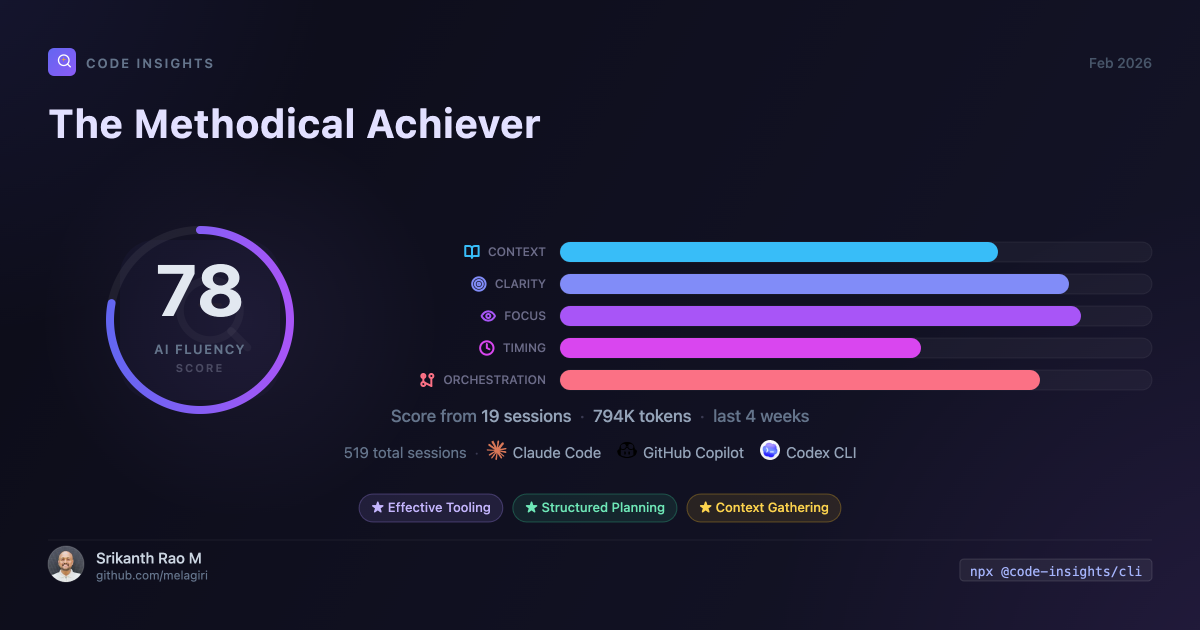
The score is derived from your session analysis: prompt quality scores, effective pattern frequency, friction trends, and working style classification.
Minimum Thresholds
- 8 sessions with facets in the target week — required for synthesis
- If fewer than 8 are analyzed, the CLI shows a message and exits without calling the LLM
- If fewer than 50% of the week's sessions have facets, a warning is shown but synthesis proceeds
Run code-insights reflect backfill to bring more sessions up to the threshold.